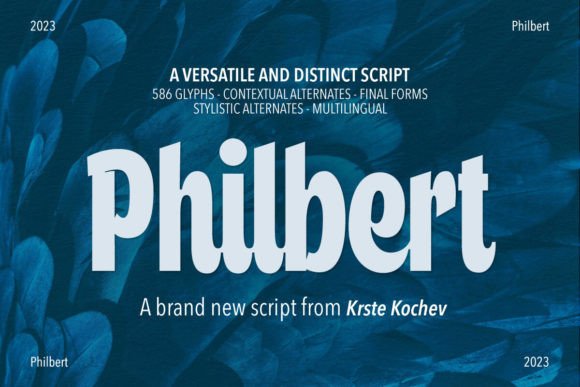
Philbert: A Modern Script Font with Serif and Sans Serif Alternatives
Finding a script font that feels both expressive and professional can be a real challenge. Many handwritten or script typefaces lean too casual, making them unsuitable for business materials, while others feel overly stiff and lose their human touch. This is where Philbert comes in as a compelling solution for designers and creators seeking that balance. It’s a modern script font designed with a keen eye for contemporary aesthetics and practical application. The core of its appeal lies in its fluid, elegant strokes that convey personality without sacrificing clarity.
What truly sets Philbert apart is its built-in versatility. Each character in the font family comes with a sans serif alternative. This isn't just a minor feature; it's a fundamental design advantage. Imagine crafting a logo where the brand name flows in a graceful script, and the tagline sits neatly in a clean, complementary sans serif—all from the same typeface family. This inherent cohesion eliminates the guesswork and potential visual clash of pairing separate fonts, streamlining the design process and ensuring a harmonious result. It’s a practical feature that speaks directly to the needs of modern branding and multi-platform design.
Where Philbert Shines: From Branding to Social Media
The applications for a font like Philbert are extensive, touching nearly every area of visual communication. Its personality strikes a perfect note for projects that need to feel approachable yet refined.
Logo Design and Brand Identity: For entrepreneurs and small business owners building a brand from the ground up, Philbert offers a distinct voice. The script component can form the primary logo mark, infusing it with warmth and creativity, while the sans serif alternative provides a stable, readable foundation for the business name, website, or contact information. This combination is particularly effective for brands in lifestyle, beauty, food, boutique retail, and creative services. It helps build a brand identity that feels both personal and polished, aiding in recognition and establishing a clear visual hierarchy.
Editorial and Packaging Design: In publishing, a well-chosen script font can elevate headlines, pull quotes, or chapter titles in a book or magazine. Philbert’s clarity ensures it remains readable at smaller sizes, a common pitfall of many script typefaces. For packaging design, it adds a human, artisanal touch to product labels, gift tags, and box designs. Think of a coffee bag, a candle label, or a cosmetic box—the script element communicates craft and care, directly influencing brand perception and audience engagement.
Digital Presence and Marketing Materials: Consistency across platforms is key. Philbert works beautifully for website headers, blog post titles, and social media graphics. Its modern style translates well to screen, maintaining its charm on everything from Instagram stories to Pinterest pins. When used in email marketing or digital ads, it can draw the eye and create a focal point, guiding the reader’s attention effectively. The inclusion of open-type capabilities means you can access stylistic alternates and ligatures, adding subtle custom flair to your designs without needing advanced software skills.
Practical Guidance for Using Philbert in Your Projects
Adopting any new design asset requires a thoughtful approach. Here’s how to evaluate and implement Philbert for the best results.
Evaluate the Project Fit: Start by considering the project’s tone and audience. Philbert excels where a blend of creativity and professionalism is desired. It’s an excellent creative font choice for a wedding invitation, a café menu, or a boutique’s website. For a law firm’s annual report or a technical manual, a traditional serif font or a sturdy sans serif font might be more appropriate. The goal is to match the font’s personality with the project’s communication goals.
Mastering Font Pairing: While Philbert’s built-in sans serif alternative simplifies pairing, you can also combine it with other typefaces for more complex layouts. A good rule of thumb is to contrast, not compete. Pair the script element with a simple, geometric sans serif for a clean, modern look. Alternatively, for a more classic feel, it can sit alongside a traditional serif. Always test your pairings in context—see how they look in a paragraph, a headline, and a mobile view to ensure readability and a balanced visual hierarchy.
Leverage the Full Font Family: Don’t just install and use the basic script. Explore the full package. A quality premium font like Philbert often includes multiple weights, stylistic sets, and ligatures. These features allow you to customize the letterforms for a unique touch. For instance, you might use a more flourished alternate for a logo initial and a simpler form for body text. Understanding these open-type capabilities gives you greater control and helps you create more dynamic, engaging typography.
Consider Licensing and Consistency: If you’re using Philbert for commercial work—like client projects, merchandise for sale, or business branding—ensure you have the correct commercial font license. This is a standard part of professional practice. Once deployed, use the font consistently across all touchpoints to strengthen your brand identity. Document which styles and alternatives you use for headings versus body text to maintain consistency across your team or future projects.
Ultimately, Philbert is more than just a modern script font; it’s a versatile typographic tool. Its strength lies in its ability to adapt, providing both the expressive flair of a handwritten font and the structured reliability of a sans serif. By understanding its features and applying it thoughtfully, you can enhance your designs, communicate more effectively, and build a more memorable and professional visual presence.